What is Automotive BDC Software?
Automotive BDC software is a specialized platform built for dealership Business Development Centers to manage lead routing, multichannel communication (calls, texts, emails), appointment scheduling, and agent performance tracking. Unlike generic CRMs, it supports dealership-specific workflows, such as DMS integration, campaign automation, and real-time productivity monitoring.
BDC software exists because the volume and speed demands of modern dealership lead management exceed what generic tools or manual processes can handle. 56% of dealership leads arrive after hours, yet the average response time for those leads is 17 hours, while a 1-minute response time correlates with 391% more conversions.
Most dealerships don’t struggle with getting leads anymore—they struggle with responding fast enough and consistently enough to convert them. Over half of dealership leads now arrive after hours, while average response times remain 17 hours. That gap is exactly why BDC software exists.
The market reflects this shift: “The auto dealership CRM software market grew from $5.52B in 2023 to $6.13B in 2024. Dealership CRM and BDC tools have become a $6B+ category and are growing steadily as digital retailing, AI, and customer expectations evolve. If you want a deeper breakdown, explore our guide on “What is Automotive BDC and Its Best Practices?”
(Source: The Business Research Company — Tier 1 independent research firm)
Types of BDC Software — Know What You’re Comparing
Here’s where most dealership buyers go wrong: they compare tools within the wrong category.
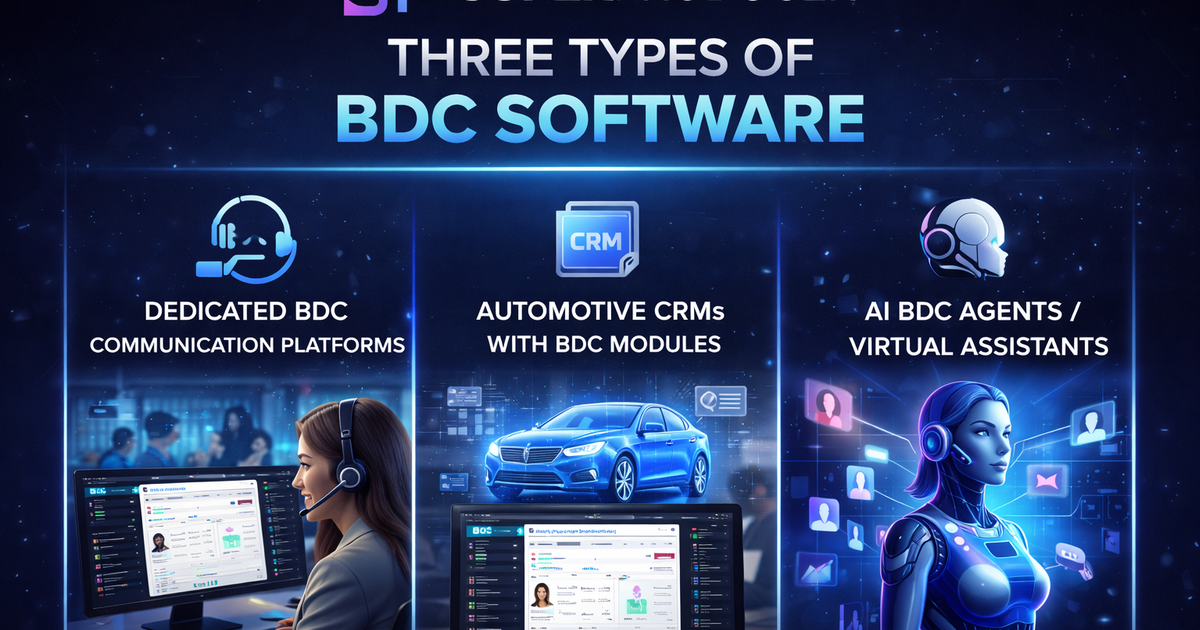
“BDC software” isn’t one thing—it’s three very different product types.
Dedicated BDC Communication Platforms
These tools are built specifically for BDC teams.
What do they work best on?
- Handles high-volume outbound calling (auto-dialers)
- Manages service follow-ups and reminders
- Provides you with real-time agent dashboards
- Call recording and performance tracking are managed
What they don’t do: They are not full CRMs. They sit on top of your existing system.
Best for: Dealerships are happy with their CRM but struggling with BDC execution.
Examples: Volie, Dealer Focus, Sweet Relish
Automotive CRMs with BDC Modules
These are all-in-one platforms that include BDC workflows.
What they do:
- Lead management and routing
- Appointment scheduling
- Follow-up automation
- Inventory, desking, and F&I tools
Best for: Dealerships replacing the outdated systems or wanting one unified platform.
Examples: Elead CRM, VinSolutions, DriveCentric, DealerSocket, ProMax, AutoRaptor
AI BDC Agents / Virtual Assistants
This is the fastest-growing category.
What they do:
- Instantly respond to leads (24/7)
- Automate follow-ups via SMS/email/chat
- Set appointments without human input
Best for:
- After-hours lead coverage
- Reducing BDC workload
- Supporting small teams
Examples: Podium AI, DriveCentric AI, Spyne AI BDCVolie says 750+ dealerships, claims 4X agent productivity improvement
(Source: Voile - Tier 3 vendor claim; CBT News coverage)
What BDC Software Actually Costs
BDC software pricing varies widely depending on the type of platform and dealership size:
- Small dealer CRM solutions (like AutoRaptor, Selly, and Frazer): typically range from $300–$900 per month
- Enterprise CRM platforms (such as DealerSocket, Elead, Salesforce Automotive Cloud) usually fall between $1,000–$3,000 per month
- Dedicated BDC platforms: often quote-based, but most dealerships can expect $500–$1,500 per month per rooftop
- AI BDC tools: pricing varies—some charge per lead or per conversation, while others bundle it into CRM subscriptions
(Source: AutoRaptor blog — Tier 3; pricing self-reported but consistent with market)
The Hidden Cost of Not Using BDC Software
This is where the real math changes.
- Average BDC rep salary: ~$37,575/year
- BDC manager: ~$70,000/year
- Turnover rate: 30–40% annually
- Sales team loses ~2.5 hours/day on admin work
That’s not just payroll—it’s lost productivity, missed leads, and inconsistent follow-ups.
The real question isn’t: “Can we afford BDC software?”
It’s: “Can we afford slow response times and lost opportunities without it?”
(Source: ZipRecruiter — Tier 2, Feb 2026)
How to Match BDC Software to Your Dealership Size
There’s no one-size-fits-all solution.
Single-Store Independents / BHPH
- Prioritize affordability and ease of use
- Look for CRM with built-in BDC features
- Consider adding AI for after-hours
Good starting points: AutoRaptor, ProMax
Small Franchise (1–3 Rooftops)
- DMS integration becomes critical
- Choose ecosystem-compatible tools
Typical setups:
- VinSolutions (Cox ecosystem)
- Elead (CDK ecosystem)
- Add volume if the call volume increases
Mid-Size Groups (4–10 Rooftops)
- Focus on reporting and standardization
- Need visibility across stores
Best fit: DealerSocket, Elead + dedicated BDC platform
(Source: Driftrock guide — Tier 2)
Large Enterprise (10+ Rooftops)
- CRM is often already decided (OEM-driven)
- Focus shifts to:
- BDC optimization
- AI layering
- ROI tracking across locations
Feature Priority by Scale
Dealership Size
Must-Have Features
All sizes
Lead routing, communication, scheduling, and DMS integration
3+ rooftops
Workflow standardization, dashboards
10+ rooftops
Enterprise reporting, APIs, centralized BDC
AI BDC vs. Human BDC Reps — What to Expect
AI-powered BDC tools are gaining traction for a reason—they solve some of the biggest operational gaps dealerships face today.
Instant lead response is one of the biggest advantages. Speed matters more than ever, especially since 56% of dealership leads arrive after hours, while the average response time still sits around 17 hours (Source: NADA). AI closes this gap by engaging leads immediately, even when your team is offline.
Automated follow-ups are another major strength. Instead of relying on reps to remember every touchpoint, AI ensures that texts, emails, and appointment reminders are sent consistently and on time. This improves lead nurturing without increasing workload.
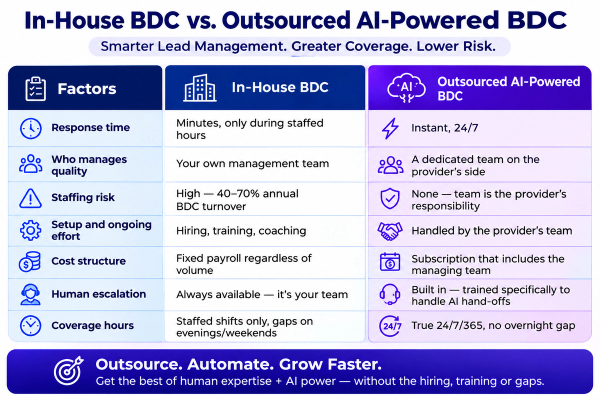
24/7 availability also makes a significant difference. Unlike human teams, AI doesn’t take breaks, call in sick, or leave the organization—something that matters when dealerships face a 30–40% annual turnover rate in BDC roles (Source: Digital Dealer).
AI also helps with lead scoring and prioritization, identifying high-intent prospects so your human reps can focus their time on conversations that are more likely to convert.
Some platforms are already pushing performance claims further. For example, tools like Podium AI report up to 50% higher lead conversion rates compared to human-only BDC teams
There’s a lot of hype here—on both sides.
Where AI BDC Excels
- Instant response (critical for after-hours leads)
- Automated follow-ups
- 24/7 availability
- Lead prioritization
Where AI Still Falls Short
- Handling complex objections
- Emotional conversations
- Negotiations
- Building long-term relationships
The Real-World Model
The best dealerships don’t replace humans—they combine AI + human efforts.
- AI helps you in handling various things, such as:
- First response answering
- Managing the after-hours leads
- Routine follow-ups
- Humans handle:
- Calls
- Complex queries of customers
- High-value buyers
The biggest risk? Poor handoffs between AI and humans. That’s where deals are lost.
Warning Signs Your Current BDC Software Is Failing
Even if you already have a system, it might not be working.
Low Team Adoption
If reps use spreadsheets or sticky notes, your system is too complex. Even if you already have BDC software in place, that doesn’t mean it’s working the way it should. In many dealerships, the system isn’t broken—it’s just underperforming quietly in the background.
(Source: Driftrock CRM evaluation guide — Tier 2)
Leads Still Slip Through
Automation alone doesn’t guarantee results. If your appointment set rate is below 10% or your lead-to-sale close rate is under the 10–15% benchmark, something isn’t working.
(Source: Maritz benchmarks — Tier 2)
Weak Reporting
Your BDC software should give you answers, not just data.
If your manager can’t quickly answer questions like:
- Which lead source produces the highest appointment show rate?
- Which rep has the fastest response time?
—then your reporting isn’t actionable.
Metrics like total calls made or emails sent only show activity. What you actually need is visibility into performance and outcomes.
DMS Sync Issues
If customer data doesn’t match across systems, trust breaks instantly.
If a customer has to repeat information they’ve already shared online or if your team sees conflicting data between systems, trust is lost instantly. In fact, 83% of dealers report that customers repeat steps in-store due to inconsistent data across systems.
(Source: Cox Automotive 2025 — Tier 1)
Poor Lead Response Quality
Most dealerships still:
- Don’t include pricing
- Don’t include photos
- Don’t personalize responses
Even with automation tools available.
Studies show that:
- 91% of dealership responses don’t include pricing
- 90% don’t include multiple vehicle photos
- 74% fail to include a price quote
Getting Started — Implementation Considerations
Choosing the software is only half the job.
What to Expect
- Dedicated BDC tools: 2–4 weeks setup
- Full CRM migrations: Several months
Key Tips
- Roll out in phases (sales or service first)
- Expect staff turnover—build repeatable training
- Always test with real data before committing
- Assign a clear internal owner (usually BDC manager)
There’s no “best automotive BDC software” in isolation.
The best setup is the one that fits:
- Your dealership size
- Your existing systems
- Your team’s workflow
- Your response-time challenges
Most high-performing dealerships don’t rely on a single tool—they build a BDC stack:
- CRM (system of record)
- BDC platform (execution layer)
- AI (speed + scale)
Conclusion
Choosing the right automotive BDC software isn’t about picking the most popular tool or the one with the longest feature list—it’s about finding what actually fits your dealership’s day-to-day reality.
Every dealership operates differently. A single-store setup might need something simple and cost-effective, while a multi-rooftop group needs deeper reporting, tighter integrations, and standardized workflows. The key is to align your software with how your team works, not the other way around.
It’s also important to think beyond just the tool. BDC success comes from a combination of the right technology, well-defined processes, and a team that actually uses the system consistently. Even the best platform will fail if adoption is low or workflows aren’t clearly set.
AI is quickly becoming a valuable addition, especially for handling after-hours leads and speeding up first responses. But it works best when paired with human reps who can build relationships and handle more complex conversations. The goal isn’t to replace your team—it’s to make them more efficient.
At the end of the day, the dealerships that win are the ones that respond faster, follow up better, and create a smoother customer experience. The right BDC setup helps you do exactly that—by making sure no lead is missed, no follow-up is delayed, and every opportunity is handled with consistency.
Instead of asking “What’s the best automotive BDC software?”, the better question is: “What setup will help my team convert more leads, more consistently?”

Manan Bhalodia
Expert in automotive AI solutions and customer service optimization. Passionate about helping automotive dealerships leverage technology for growth.